Samsungs nye firmware, der udrulles gradvist, opgraderer Tizen 7.0 til 8.0 på 2023-modellerne. Der er ændringer i brugerflade og visse nye funktioner.
Efter for nylig at have annonceret planer om endelig at opgradere Tizen-styresystemet i Smart TV og udvide sin One UI – kendt fra Galaxy smartphones – til Smart TV, har Samsung igangsat opdatering.
2023-modellerne (QN*C, S*C, CU*) blev lanceret i foråret 2023 præinstalleret med Tizen OS 7.0, uden plan om opgradering. De ændrede planer kom efter at Samsung – verdens største TV-producent – blev underlagt stigende pris som eneste TV-producent, der ikke tilbød OS-opgradering.
Den nye firmware (ver. 2011), der udrulles nu, opgraderer Tizen OS i 2023-modellerne fra version 7.0 til 8.0, hvilket er samme version som i 2024-modellerne. Udrulningen sker gradvist over adskillige uger, så tjek opdateringsmenuen på din skærm løbende.
Læs også: Test: Samsung S95D QD-OLED
Tizen 8.0: Opfrisket hovedskærm, Game bar
Tizen 8.0 introducerer en opfrisket hovedskærm med fanerne 'Udforsk', 'Live' og 'Apps' (under den store reklame-karussel). Der er også en ny indholdshub, Samsung Daily+.
Af nye funktioner kan nævnes Samsungs nyeste Gamebar med hurtig adgang til gaming-funktioner, Q-Symphony-support der muliggør trådløs forbindelse til den nye Music Frame-højttaler samt udvidet integration med Galaxy Watch. Udgivelsesnoterne fremgår af tabellen.
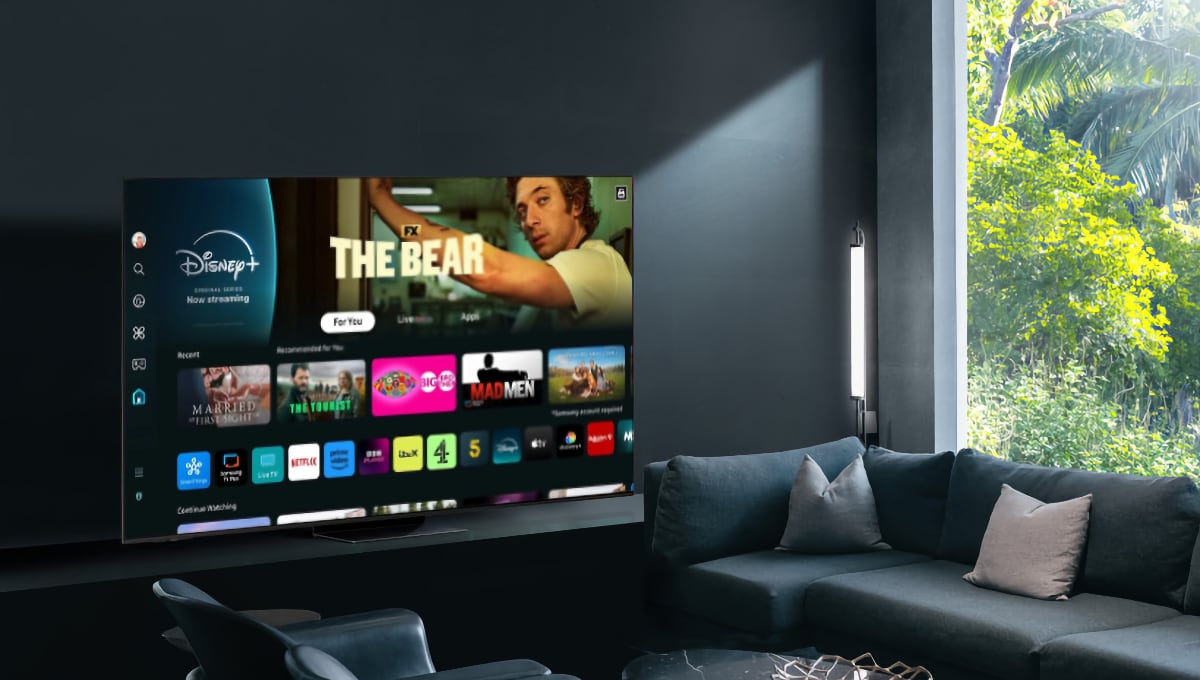
Firmwaren bringer Tizen 8.0 til 2023 Samsung-modeller. Foto: Samsung
Op til 7 års Tizen-opgradering
Samsung har forpligtet sig til at opgradere udvalgte Tizen OS-baserede Smart TV i op til 7 år. Der er tale om visse modeller fra 2023 og nyere modeller.
Ærkerivalen LG har forpligtet sig til fire OS-opgraderinger over fem år. LG er også netop begyndt at rulle webOS 24 ud til 2023-modeller, forud for tidsplanen.
Yderligere One UI-elementer forventes klar i næste års Samsung TV. 2025-modellerne afsløres på CES-messen i januar 2025.
Samsung firmware 2011 – udgivelsesnoter
| One UI
Discover Endless Possibilities with One UI
Immerse yourself in a unique Samsung screen experience with personalized content, optimized gaming, fitness, and seamless connectivity for a wide range of devices.
Notify Update
This upgrade includes changes and improvements as listed below.
The exact changes may differ depending on your device model, country, etc.
Some of the features that change may require you to sign in to a Samsung account.
Please keep your device up to date and regularly check for software updates.
Once you install this version of the OS, you cannot uninstall or revert back to the previous version.
Samsung Tizen OS Updated
Samsung Tizen OS version upgrade from 7 to 8 including open-sources and new features.
Upgrading the web engine from version 94 to 108 in Samsung Tizen OS 8.0
Home Screen
For you tab (personalised recommendations), Live tab and Apps tab have been implemented, allowing easy access to the content and apps you want.
Watch Later
The “Watch Later” feature has been added to the content details screen, enabling users to save preferred content in a Watch Later list and enjoy it conveniently.
Samsung Daily+
A lifestyle service hub that provides useful daily life experiences has been added to the Home screen.
Search
Recently searched content and related content have been implemented as recommendations.
Multi Control
You can control multiple Samsung devices signed in with the same Samsung account using the same keyboard and mouse.
Workout Tracker
By connecting your Galaxy Watch, real-time workout data, including calorie consumption and heart rate, can be monitored. For more details, refer to the guide available on Daily+.
Remote Setting/123/Colour Button
Based on usage history and present circumstances, tailored channel and setting recommendations can be provided
SmartThings
loT cameras can be used through the Smart Things app on mobile devices
Accessibility
The Accessibility Shortcut can rearrange its options according to usage frequency.
Programme guide
The design has been updated to enhance user convenience and “Samsung TV Plus” has been added as a new category.
On-screen keypad
Supported languages have been expanded. The mouse Drag & Drop feature has been enhanced, and when a mobile device is connected, the input pad will be displayed on the mobile screen automatically.
Game Bar
The game bar interface has been changed to the latest design.
Multi View
Zoom in screens on request. When mirroring a mobile device, you can use keyboard and mouse controls.
Daily Board
With Daily Board, you can decorate the screen with beautiful wallpapers and useful widgets – even when the screen is off.
ConnecTime
New features include video calls, messaging, and mobile screen sharing for TV and mobile.
Security undate
Enhanced data protection measures have been implemented (Samsung account sign-in required.
Q-Symphony
Wi-Fi Speaker Surround Setup has been upgraded to Q-Symphony, enabling connection to the Music Frame.
Notice of change in supported apps
Certain apps may not be compatible with Samsung Tizen OS 8.0. Check compatibility with app providers before upgrading your device. |
Flatpanels
